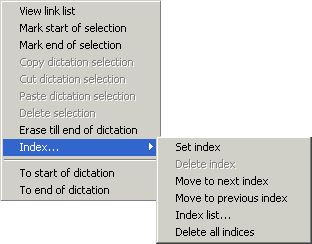
Setting an Index marks a particular position within a dictation.
Right-click on the Progress Display in the Recorder to set or jump to an Index point. There are also options to jump to the beginning or end of a dictation.
Set Index
Setting an Index using the "Set Index" menu option allows you to jump directly to that point in the dictation. The index is set at the current position shown in the Progress Display (yellow rectangle) and not where you clicked with the right mouse key.
 Alternatively an Index can be set using the [0] key.
Delete Index
An Index can be deleted by jumping to it and then selecting the menu option "Delete Index"
, or the Delete key on the keyboard.
Alternatively use the Delete key on your keyboard to delete.
Delete all Indices
The option "Delete all indices"
will remove every index from a dictation.
Move to Next Index
To jump directly to the next index, select the menu option "Move to Next Index"
.
The number 6 key on the keyboard will also move you to the next index.
Move to previous Index
To move back to the previous index, select the menu option "Move to Previous Index"
.
The number 4 key on the keyboard will also move you to the previous index.
Index list
Choose the option "Index List"
to see all the indexes that have been set for a dictation.
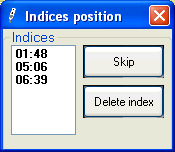
You can move between Indexes in the list by selecting an Index with a left-click and then clicking the button "Next Index", or by using the up/down arrow keys on the keyboard. You can also select an index with a left mouse click and delete it by clicking the button .
To Start of Dictation
Select the menu option "To Start of Dictation" to return to dictation position 00:00.
To End of Dictation
Select the menu option "To End of Dictation" to go directly to the end of the dictation.