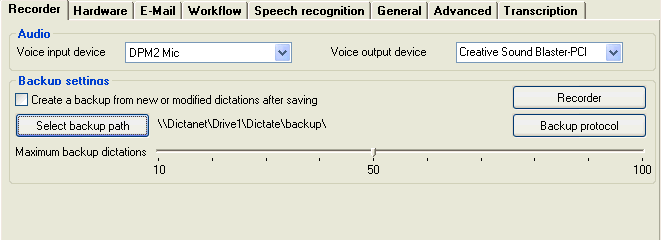
Use the Backup settings button on the Recorder tab to manage the dictation backups.
If you want to check if imported or recorded dictations are being saved correctly in the Backup folder, then use the [Backup protocol] button. Dictations moved from folder to folder in the network dictation directory also get a backup copy.
The date, time and status is shown for each dictation when saved for the first time. The backups are named 01 to 99.wav and are saved in the local dictation directory on the local disk, e.g. C:\Program Files\DictaNet\Dictation\Backup. A backup of a dictation can be easily restored using the Import function.
Create a backup from new or modified dictations
after saving
The backup copy is normally created when the dictation is first saved and
not updated further. This additional option allows another backup copy to
be created each time the dictation is re-loaded from the network folder and changed
(overwrite, insert, extend etc.). This is recommended for authors who save
their dictations before they are ready and want to rework them later.
This secondary backup path can be selected (can be in the network if your system administrator wishes to archive all backups) and the max. no. of backups set to avoid overfilling any drive. All new dictations will be saved in this folder as well. These backups can be loaded manually in the Import view by setting a path for the "Local- or Net-Drive" source to the modified dictations backup folder.
 The
backups saved in this manner are also available in the Import view under
"Dictation backup files".
The
backups saved in this manner are also available in the Import view under
"Dictation backup files".