 Click on the above graphic for more information.
In the Workflow Manager both authors and typists can be evaluated. If the Advanced "dictation manager auditing" option has not yet been activated, then this function is not available and "0" will be shown as the result. Evaluation data is only recorded for new dictations from the date the option was activated. Each author/typist must have their own ID initials set on the Options / Advanced tab in the Recorder/Player.
The number of dictations, plus their individual length and size, can be shown for each author / typist, for any time period (day, month, year).
Click on the above graphic for more information.
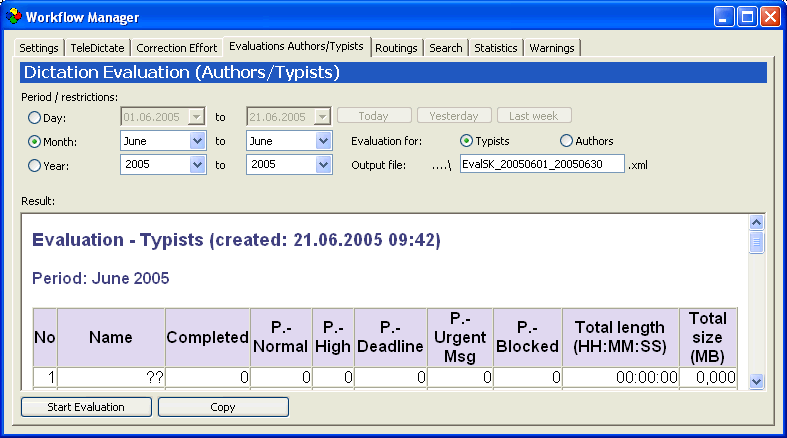
Set the time period for which evaluation details should be displayed. This can be done quickly by using the , or buttons
Evaluations for typists and authors, according to the User ID initials, are shown separately. "Evaluation for Author" shows all recorded/imported dictations, regardless if unfinished or completed. "Evaluation for Typist" shows all processed dictations, with an extra column for the completed total.
 If the results
show unwanted user initials (often with 0 dictations), they can be removed
from the evaluation by correcting the author and/or typist drop-down lists.
See Tips and
Tricks for details.
If the results
show unwanted user initials (often with 0 dictations), they can be removed
from the evaluation by correcting the author and/or typist drop-down lists.
See Tips and
Tricks for details.
Enter the name and location of the output file here.
The evaluation results are displayed on the screen and saved as an .xml file. A scroll bar will appear to facilitate navigation through a long set of results.
After entering the time period, selecting "typist" or "author", entering the name and location of the xml file, click the button to see the evalution results. More complex results will take a longer time to compute and display.
This produces a copy of the evaluation results, ready to be pasted into any application, e.g. MS Excel.