 DictaNet
Recorder Commands DictaNet
Recorder Commands
DictaNet
Recorder Commands DictaNet
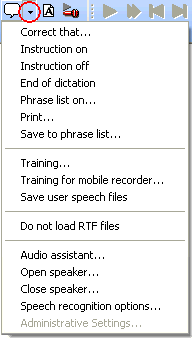
Recorder CommandsSpecial Speech Commands can be used during Online Speech Recognition to
activate various DictaNet dictation modes. The commands are
listed in the Recorder Command Menu
(click
on the arrow right
from the small speech-bubble symbol). Say
the command using the exact text shown in the menu.
The color of the
 button indicates the mode.
Black : dictation mode active
Green : instruction mode on
| Say | in order to... |
|
Instruction on |
dictate an instruction for secretarial staff. In instruction mode the recognized text will be displayed in green (like this). This tells the typist that the text is an instruction, and is not to be typed into the document. |
|
Instruction off |
switch off instruction mode. |
|
End of dictation / dictation off |
end the active dictation and open the Save/EOL Menu, where dictation details (e.g. matter/case number) can be entered |
|
E O L (say "ee oh el") |
give the End Of Letter command. This is the same as pressing the Save/EOL button. |
|
Correct that |
start Correction Mode . In this mode, incorrectly recognized text, but not the audio data, can be edited. Words can be trained if required. |
|
Phrase list on |
open a window from which a Phrase can be selected. To select the first phrase say "take one" or you could click on the phrase to select it and then click The window will close automatically. |
|
Save to phrase list |
save the selected words to the Phrase list |
|
Play document |
Playback the entire document |