 Dictation Overview
Dictation Overview
Dictation OverviewIn Dictation Manager dictations can be loaded into the Player or Recorder,
sent for speech recognition or by e-mail, moved, deleted or have their details
changed. Dictation Overview shows the dictations in the folder
 that is open in Dictation Manager. The overview takes the form of a
table with rows and columns, where each dictation is a row and details of that
dictation are displayed in the various columns. Many fields can be clicked
on to change the information for a particular dictation.
that is open in Dictation Manager. The overview takes the form of a
table with rows and columns, where each dictation is a row and details of that
dictation are displayed in the various columns. Many fields can be clicked
on to change the information for a particular dictation.

 Click on a column in the above graphic for more
detailed information.
Click on a column in the above graphic for more
detailed information.To load a dictation, click on the loudspeaker symbol in the 'A' column. The rows are color-coded to show status.
Dictation Overview can also be viewed in combination with the Dictation
Directory or Statistics/Graphic views.
Dictations can be dragged-and-dropped into other "unfinished dictations"
folders.
The [F5] key
will Refresh the contents of Dictation Overview.
When a dictation is loaded, moving the mouse pointer onto that dictation in the overview will display a tooltip indicating who (typically a typist) has currently loaded that dictation. Format is Computer_name / User_login_name.
The selection of columns is performed with a right-click on any column header. You can change the appearance of the overview (color, font, size etc) with a right-click on the background.
The list of dictations in Dictation Overview can be sorted in
ascending A-Z
or descending Z-A
order. To sort by a single column , left click on that column's heading. Left
click again to reverse sort . The sort direction is also indicated by an up or
down arrow.

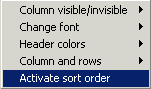
The dictations can be sorted on multiple columns if this option has been selected and activated in . You can switch between single- and multiple-column sorting by right-clicking on a column heading and selecting "Activate Sort Order". A check symbol here indicates that the sorting will be carried out as shown in .
Single-column sorting can only be performed when the "Move
Columns" function has been deactivated.